
GitHub Issue Sync
How Zenhub keeps your GitHub issues in sync using webhooks and a two-way data synchronization engine.
Zenhub allows you to add GitHub issues to your workspace as a data source and maintains a two-way sync between those issues. Any change you make in Zenhub is reflected in GitHub, and any change made in GitHub appears in Zenhub.
To ensure this works reliably, Zenhub does two things: automatically sets up a webhook on your GitHub repository to receive real-time notifications when issues change, and periodically scans your GitHub repository for any changes that may not have been reported through webhooks.
How webhooks are set up
You do not need to manually create webhooks. Zenhub creates them automatically when a GitHub repository is added to a workspace, subject to two conditions:
At least one GitHub user with admin access to the repository must log into Zenhub. Zenhub uses that user's tokens to manage webhooks on your behalf.
GitHub must be able to connect to Zenhub's webhook servers. If you're using an on-premise GitHub Enterprise Server deployment, the GitHub server must be able to reach Zenhub via the network.
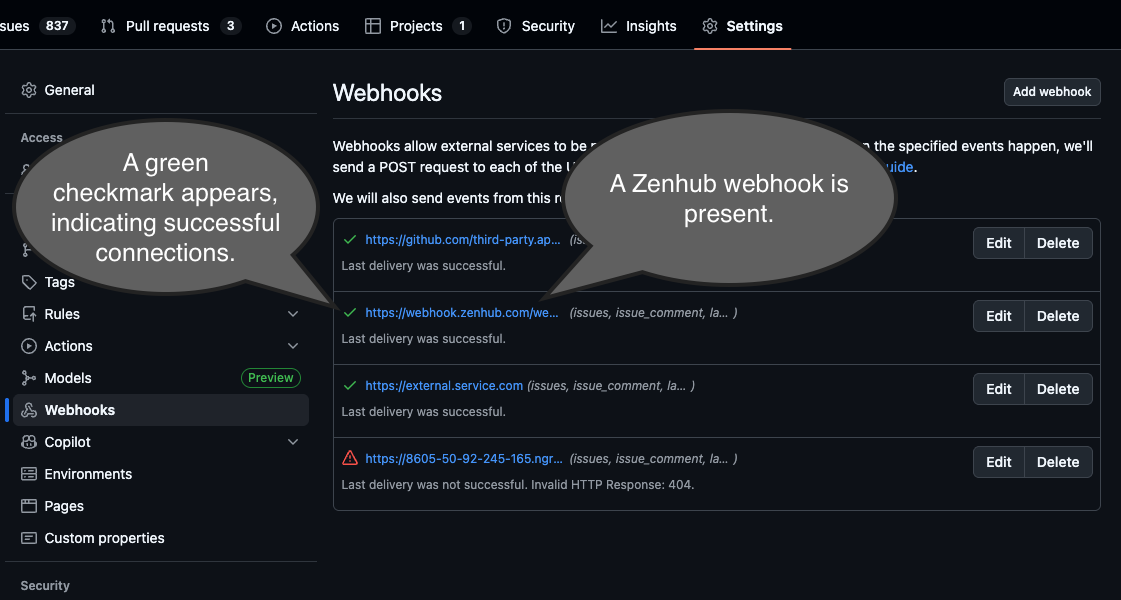
To confirm webhooks are working, go to your GitHub repository settings page, click Webhooks in the left menu, and verify you see an active Zenhub webhook showing recent activity.
FAQ
Q: I'm seeing outdated titles, descriptions, labels, or PR statuses. Why aren't my GitHub issues syncing properly?
A: The most common cause is a webhook problem. Check your GitHub repository's Webhooks settings page. If you don't see a webhook for *.zenhub.com, have a GitHub admin log into Zenhub — Zenhub will automatically attempt to recreate the missing webhook. If you see the webhook but it has a red icon, click Edit and inspect the latest connection attempts for errors. If the webhook has a green icon but sync is still delayed, check githubstatus.com for any GitHub outages. If none of the above resolves it, contact support@zenhub.com.
Q: I don't have admin access to the GitHub repository and the other admins aren't Zenhub users. Does this mean the sync will be broken?
A: If nobody in your organization has the necessary admin access, webhooks will not be properly set up. Zenhub will still periodically perform a manual sync, but you should expect significant delays of 8 or more hours. Webhooks are critical to ensuring fast and reliable data syncs between GitHub and Zenhub.