
Slack Integration
Create and comment on Zenhub issues directly in Slack, and receive real-time issue updates where your team already communicates.
Zenhub's Slack integration lets your team create, comment on, and stay updated about Zenhub issues directly in Slack — so collaboration can happen where conversations already live, even if some teammates don't have a Zenhub account. For more information see the official feature page.
What you can do

Create issues from Slack
Use the /zenhub issue command to create new issues with a description, assignees, and labels.

Comment on issues via thread replies
Reply to a Slack thread tied to an issue to add a comment. This works with or without a Zenhub account.

Get real-time issue updates
Once an issue is synced with a Slack thread, comments and updates made in Zenhub sync back to that thread so everyone stays informed.
Requirements
A Slack admin must complete the first-time connection between your Zenhub organization and your Slack workspace.
After the organization is connected, anyone in the Slack workspace can connect Slack channels to Zenhub workspaces.
A Zenhub account is not required for basic actions. However, a GitHub account is still required to create or comment on GitHub issues.
Installing the integration
In Zenhub, go to your Organization dashboard.
Open Integrations.
Select Connect your organization to a Slack workspace and click Connect.
Complete the Slack installation flow.
After installation, connect Zenhub workspaces to Slack channels from the Edit Workspace page.
Syncing an issue with a Slack thread
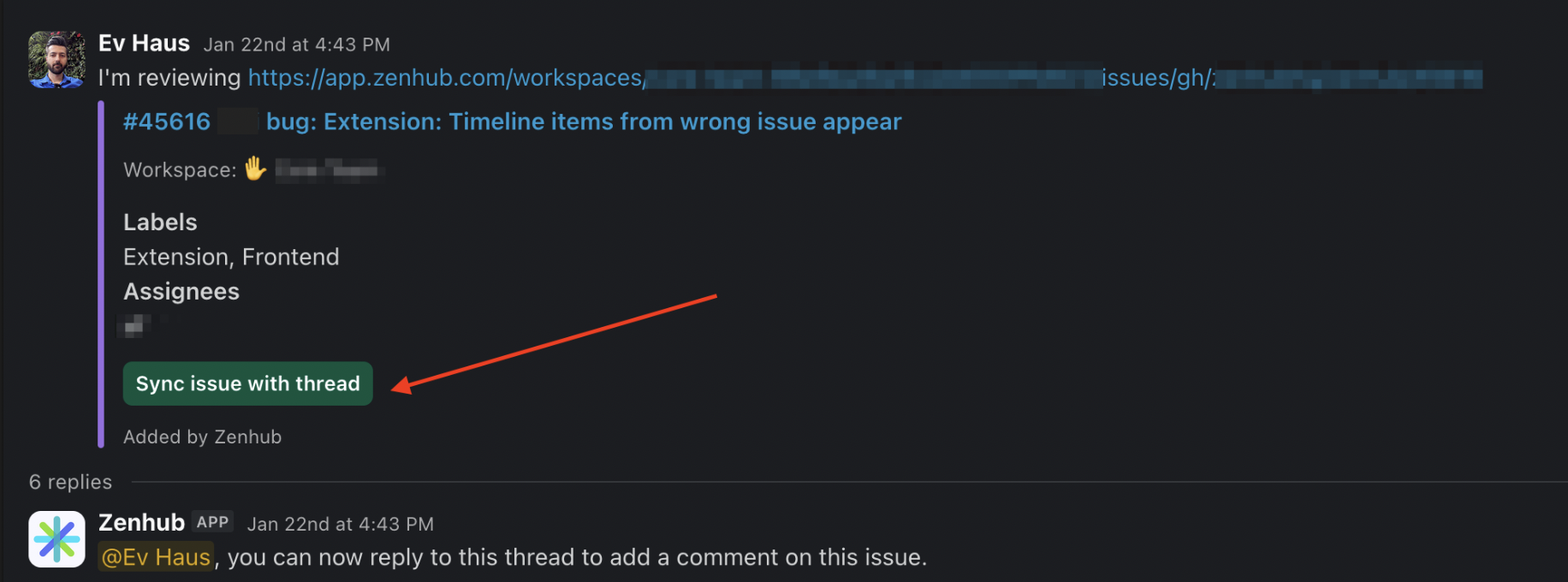
Connecting a Slack channel to your workspace doesn't send updates on its own. Updates flow through Slack threads that are synced to a specific issue. To sync one, paste the link to the Zenhub issue into a Slack thread. The Zenhub bot will confirm it found the issue; click Sync issue with thread to link them. From then on, comments and updates on that issue appear in the thread, and replies in the thread are added as comments on the issue.
FAQ
Q: I connected Slack to my workspace, but I don't see any issue updates. Why?
A: Updates only appear in Slack threads that are synced to an issue. Paste the Zenhub issue link into a Slack thread, then click Sync issue with thread when the Zenhub bot responds.