
[Oct 2026] Manage every workspace from one place
In this article
In this article group
- Changelog History
- [Sep 2026] Filter reports by issue type
- [Jul 2026] Organization Guest role
- [Jul 2026] Workspace roles and tighter access controls
- [Jun 2026] What's new in Zenhub in June
- [Apr 2026] What's new in Zenhub in April
- [Nov 2025] Shared Saved Views and Workspace Defaults
- [Sep 2025] What's new in Zenhub Fall 2025
- [Jul 2025] What's new in Zenhub in July
- [Jun 2025] What's new in Zenhub in June
- [May 2025] Request for new GitHub permissions
- [Apr 2025] Migration of Epics & Projects to Sub-issues
- [Mar 2025] What's new in Zenhub in March
- [Feb 2025] Drag and Drop in the Goals & Planning Panel & and Issue Type Update
- [Feb 2025] Goals & Planning Panel - hierarchy made easy (and fast!)
- [Feb 2025] A few more steps towards a cleaner future
- [Jan 2025] A Fresh Look for the New Year: Our New Issue Cards
- [Dec 2024] Sub-issues & Issue Types!
- [Oct 2024] Shuffled Stand Ups
- [Sep 2024] Daily Feed, Project & Milestone Quality of Life Improvements
- [Sep 2024] Performance & Stability Improvements
- [Aug 2024] Zenhub Improvements in Q2 2024
- [Mar 2024] Roadmap: Exporting and Sharing Enhancements
- [Mar 2024] Zenhub AI Beta now available for everyone
- [Mar 2024] Smart Pipelines: Issue Metadata Automation, Flag Stale Issues, WIP Limits
- [Feb 2024] Advanced Velocity Breakdown by Assignees, Epics and Labels
- [Feb 2024] Roadmap Improvements
- [Dec 2023] Email notification for Zenhub Issues
- [Dec 2023] WIP Limits for Pipelines
- [Nov 2023] Generate Acceptance Criteria using AI
- [Jun 2023] AI Suggested Labels
- [Jun 2023] Saved Views
- [Mar 2023] Zenhub Issues
- [Feb 2023] February Updates
- [Jan 2023] Performance Improvements
- [Dec 2022] Redeeming Invites at Onboarding
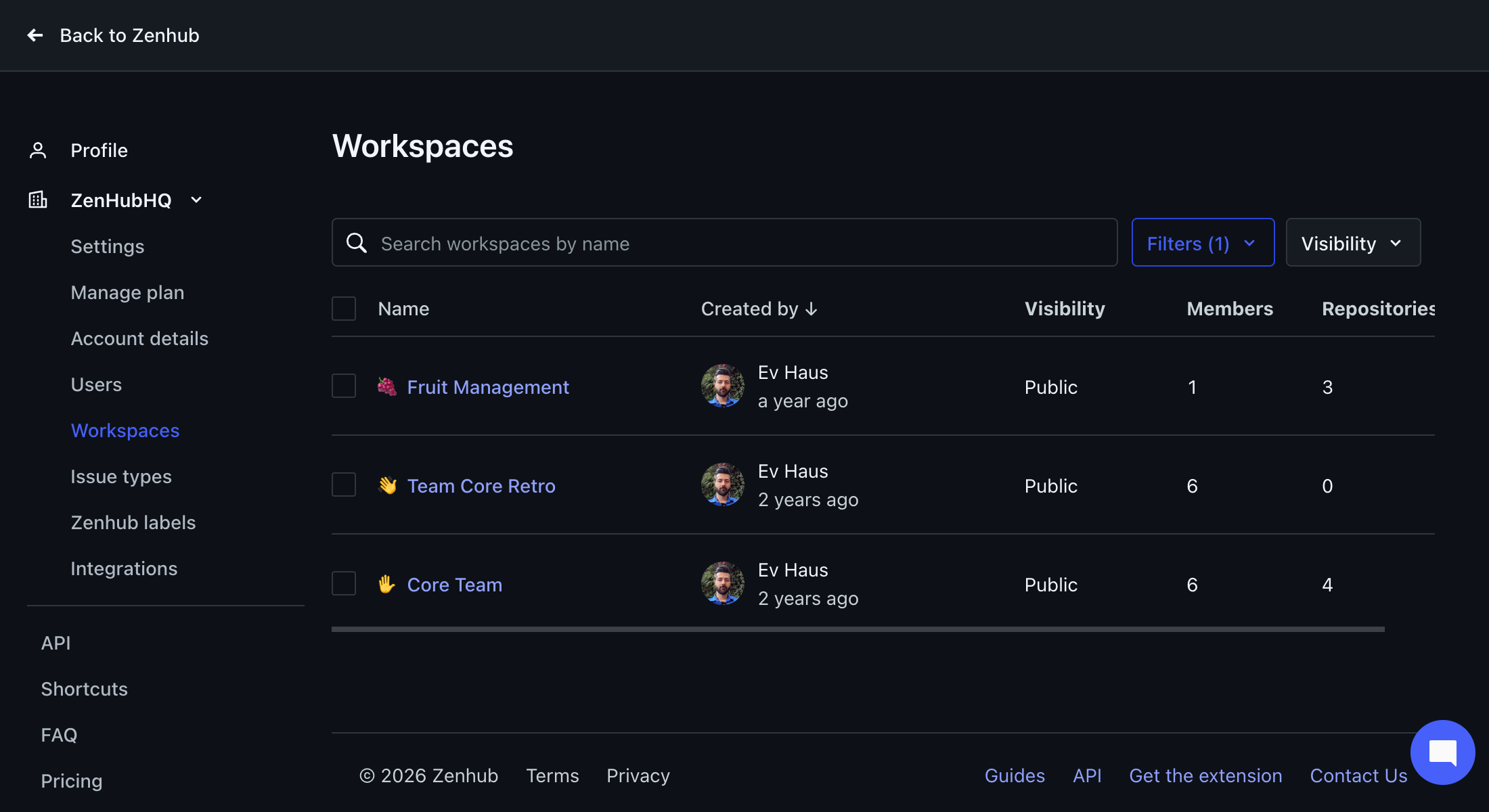
Your organization's workspaces now have a home in Settings. The new Workspaces page lists every workspace you can access in one table. You can search and filter it, delete workspaces in bulk, and see a history of who changed what.
How it works
Workspaces settings page: go to Settings → [your organization] → Workspaces, right below Users. Each row shows the workspace name, who created it and when, visibility, number of members, and number of repositories.
Filter, sort and search: the Filters menu narrows to workspaces you're a Member of, or Only mine (workspaces you created). Visibility switches between All, Public and Private. Click the Name or Created by column header to sort. Search allows you to further narrow this list by workspace name.
Bulk delete: select several workspaces and delete them in one step. You can only select workspaces where you're a workspace Admin. Caution: This will be a permanent, non-recoverable destruction of the workspace data.
See edit history: open any row's ⋮ menu and choose See edit history. This shows who added or removed members, added or removed repositories, renamed the workspace, or changed its privacy, and when.
Activity in workspace settings: the same history appears in a new Activity section at the bottom of each workspace's settings page.
History starts now: edit history covers changes from mid-October 2026 onward; earlier changes aren't shown.
Also new in October
IP allow list warning: if a GitHub organization in your workspace blocks Zenhub with an IP allow list, the workspace now shows a banner explaining why data isn't syncing. It lists the Zenhub IP addresses to add. You can dismiss it.
Clearer "issue not found" page: opening an issue Zenhub hasn't synced yet now shows a clear error page with a button to re-sync the data manually.
Smoother board drag and drop: fixed cards landing in the wrong spot when moved quickly, dropped next to a just-reopened issue, or moved while live updates arrive.
Browser extension fixes: the Zenhub tab appears in the right place on GitHub's updated repository navigation. Also fixed a tab lock-up some users hit when their trial ended.
Issue type sync fix: renaming a GitHub issue type to a name your organization already uses (even with different capitalization) no longer stops issue types from syncing.
Label filter for Goals and Planning: you can now filter the Goals and Planning panel and the Timeline by label.
Mermaid support for issues: Mermaid diagrams are now supported in issues.