
[Jul 2026] Workspace roles and tighter access controls
Zenhub now gives you finer control over who can change workspace settings, edit issues, and manage organization-wide configuration. These updates make it safer to invite external stakeholders and collaborators into workspaces without giving everyone broad write access across your organization.
Workspace roles: Admin, Editor, and Viewer
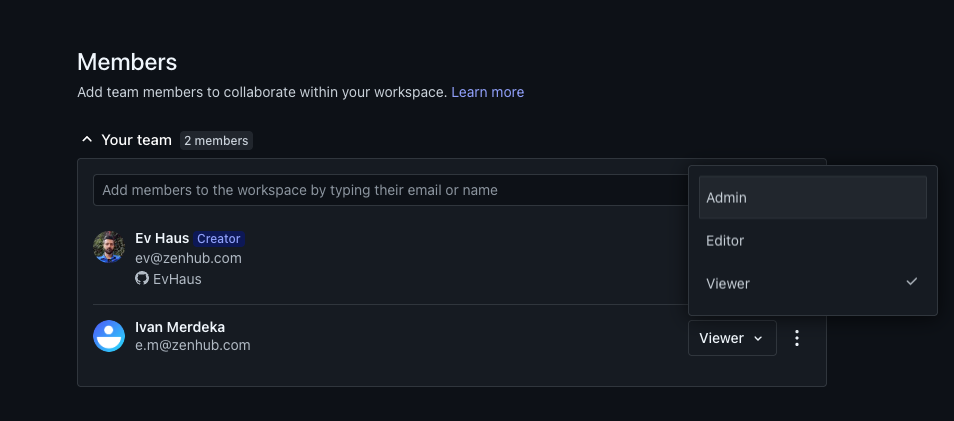
Every workspace member now has one of three roles. You can assign roles when inviting someone or change them anytime from Edit Workspace → Members.
Admin — Full control over the workspace, including settings, members, and deletion. Admins can assign any role and remove any member.
Editor — Can collaborate on the board and issues with the same write access as before. Editors can also configure workspace settings and invite or remove other Editors and Viewers, but cannot change or remove Admins or delete the workspace.
Viewer — Read-only access to the workspace. Viewers can browse the board and issues but cannot move issues, edit Zenhub metadata, or change workspace settings.
When a control is restricted, you'll see a tooltip explaining why — for example, "You have view-only access to this workspace" or "Only workspace administrators can change this."
What Viewers can and cannot do
Viewers see a read-only banner on the Work Tracker and cannot drag issues, edit pipeline headers, or create issues from the Goals & Planning panel. On issue pages, Zenhub-specific controls — estimates, releases, dependencies, issue types, parent issues, and sub-issues — are locked. GitHub-native fields (title, description, labels on GitHub issues) still follow the user's GitHub repository permissions.
Viewers can still open workspace settings to see how the workspace is configured, but all inputs and the Update button are disabled.
Open workspaces
Workspaces without any workspace admin member assigned are considered "Open" workspaces. Editors retain configuration access so the workspace stays manageable. The first person to join an otherwise unassigned workspace is automatically promoted to workspace Admin.
Organization administrators always have full access and are not restricted by workspace roles. See Workspace Access for more on how workspace roles interact with GitHub permissions.
Organization administrator controls
Sensitive organization-wide settings are now restricted to organization administrators.
Issue types — All members can view the issue type hierarchy in organization settings, but only admins can create, edit, reorder, or delete issue types.
Zenhub labels — Org-level Zenhub labels remain visible to everyone; creating and deleting labels requires an admin.
Billing and account — Manage plan and Account details remain admin-only. Non-admins who navigate to these pages are redirected back to organization settings. There are no new changes to this behaviour.
User privacy — Member email addresses in the Users list are visible only to organization administrators. Non-admins no longer see the Export users CSV option.
Non-admin members who open issue types or labels settings see the same pages with controls disabled and a tooltip: "Only organization administrators can change this."
Why this matters
Previously, normal organization members received broad Zenhub write access regardless of their GitHub repository permissions — making it difficult to safely invite external clients or stakeholders into workspaces. Workspace roles and organization admin gates let you share visibility without handing over configuration or governance controls.
GitHub repository permissions still apply for GitHub issue content. These changes tighten Zenhub-native governance on top of that foundation.
Coming soon
An organization-level Read-only role — assignable from the Users settings page — is planned as a follow-up. That role will restrict write access across the organization, complementing the per-workspace Viewer role introduced here.