
[Sep 2026] Filter reports by issue type
You can now filter Release Report, Lead & Cycle Time, and Team Velocity by issue type — the same GitHub and Zenhub types you already use on the Work Tracker.
That means reports can answer the questions labels were a poor stand-in for: how much remaining work is feature work vs. docs, QA, or design; how intake compares to delivery; and whether velocity is coming from product work or everything else on the board.
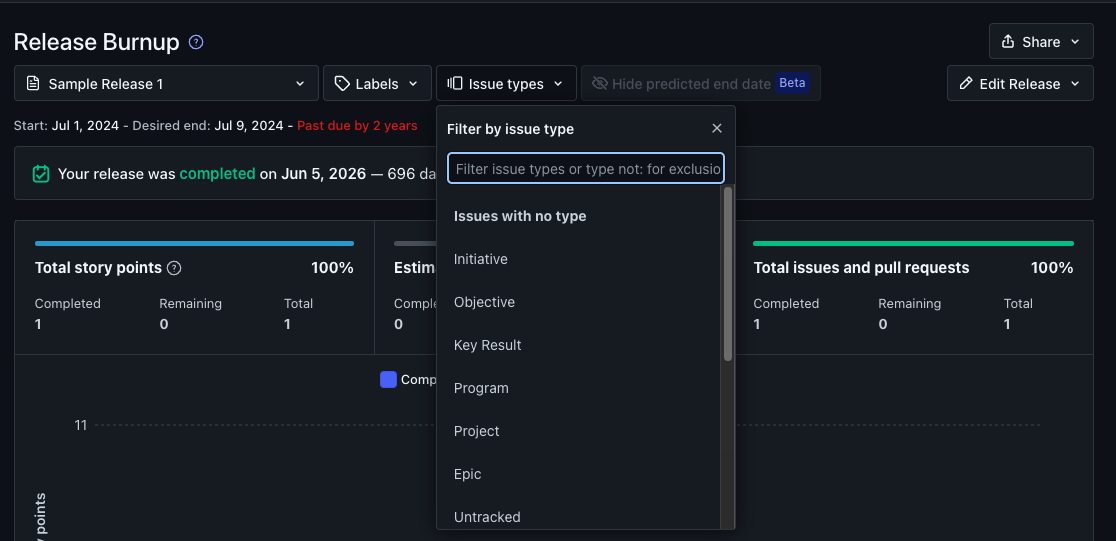
What’s new
Each of these reports now has a multi-select Issue type filter, alongside the filters you already know (like labels):
Release Report — isolate remaining work by type so release charts reflect the work you actually care about shipping.
Lead & Cycle Time — compare how long different kinds of work take, instead of blending feature delivery with support or process tasks.
Team Velocity — see throughput for the types that represent delivery, without non-dev work inflating (or hiding) the trend.
How it works
Same types as the board — the filter lists GitHub issue types and Zenhub issue types together, merged by name, just like Work Tracker.
Multi-select — include one type or several. Exclude types when you want a report of “everything except” a category.
Works with other filters — combine issue type with labels and the rest of the report’s existing filters.
When to use it
Use issue type filters when you want governance metrics that match how you categorize work:
A release view of remaining feature work, without docs or design tasks in the same chart
Lead and cycle time for intake vs. delivery types
Velocity that reflects product output, not the full mix of tickets on the board
Work Tracker already supported this filter. Reports now follow the same pattern.
Learn more
Using Issue Types — set and change types on issues
Work Tracker Basics — the board filter this matches