
Organization Access
Control who belongs to your Zenhub account, what they can manage at the org level, and how much of the organization they can see.
Organization access is the first layer of Zenhub permissions. It decides who is part of your Zenhub organization, who can manage billing and settings, and whether someone has broad access across the org or only the workspaces you invite them into.
For day-to-day collaboration inside a single workspace, see Workspace Access. For a high-level map of all three layers, see Roles & Permissions Overview.
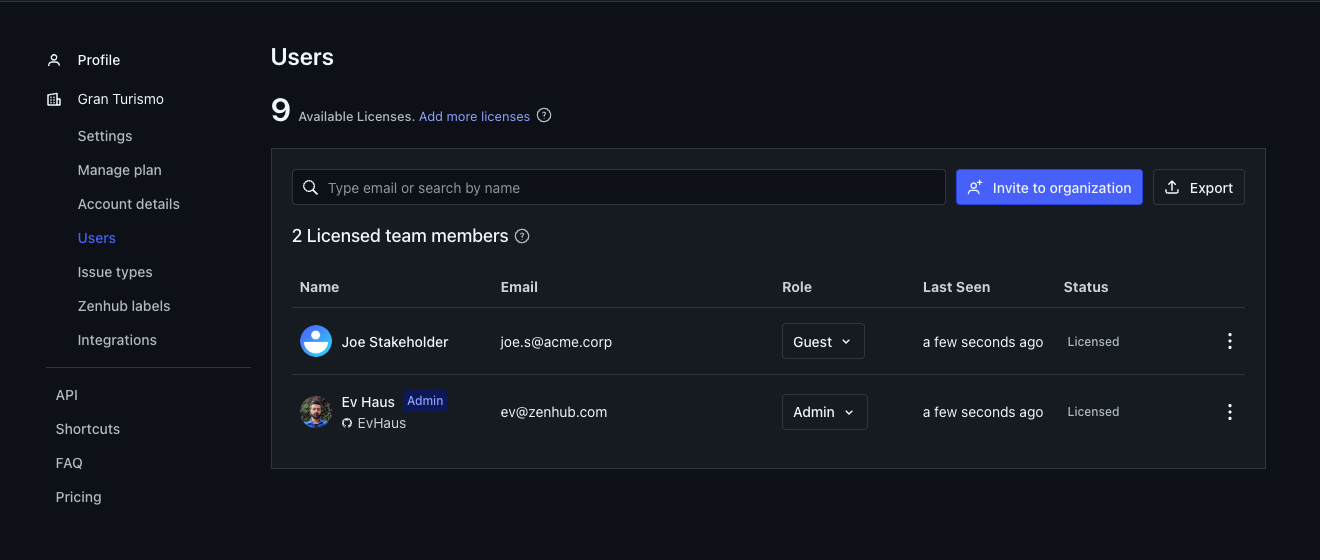
What organization access controls
Membership in your Zenhub organization (and whether that membership uses a seat)
Who can change organization settings, billing, and invites
Who can create workspaces
Whether someone can browse the full organization, or only the workspaces they are explicitly added to
TIP: Organization roles are about account-level access. Workspace roles are about what someone can do inside a specific workspace. Most people need both set correctly.
Organization roles
Every person in your Zenhub organization has one organization role:
Admin — Full organization governance: billing and subscription, seats and invites, organization settings, and administrative actions across the org. Organization admins also have workspace-admin powers on every workspace, including private ones.
Member (sometimes labeled Normal) — Standard licensed access. Members can use workspaces they belong to or can join, create workspaces (when allowed by your plan), and collaborate based on their workspace role. They do not get organization-wide admin powers.
Guest — Seated access for people who should only see specific workspace(s), and only as Viewers there. Guests remain workspace Viewers (they can’t move issues, change metadata, or manage the board), except they can create Zenhub Issues and edit the title and description of Zenhub Issues they created. Guests are the right fit for a third-party stakeholder, consultant, or partner who needs visibility into selected work without full org membership. Guests cannot invite others, create workspaces, or open organization settings. They do not automatically get into shared/public workspaces in the org — you must add them explicitly.
You may also see an External membership type used for limited integration scenarios (for example, someone commenting through Slack without a normal Zenhub login). External users are not the same as Guests.
Primary use case for Guest
Invite a stakeholder or consultant who should:
Belong to your Zenhub organization (and use a seat)
Only see the workspace(s) you add them to
Remain a workspace Viewer — they can’t move issues, change metadata, or manage the board, but they can create Zenhub Issues and edit the title and description of ones they created
That combination keeps day-to-day team work private to the team while still giving outside collaborators a clear, limited window into progress — plus a lightweight way to file their own Zenhub Issues.
Role comparison
Capability | Admin | Member | Guest |
|---|---|---|---|
Uses a seat/license | Yes (when seated) | Yes (when seated) | Yes |
Organization settings & billing | Yes | No | No |
Invite people to the organization | Yes | Yes | No |
Create workspaces | Yes | Yes | No |
See shared/public workspaces in the org | Yes | Yes | Only if explicitly added |
Access private workspaces | Yes (all) | Only if invited | Only if invited |
Browse the full org member list | Yes | Yes | No — limited to people they encounter in their workspaces |
Workspace role they can hold | Admin on every workspace | Admin, Editor, or Viewer | Viewer only |
Defaults
People invited into the organization are typically added as Members unless you choose Guest or Admin.
Guests must be seated.
Changing someone to Guest lowers any Admin or Editor workspace roles they already have to Viewer.
When you need workspace controls
Organization roles decide who is in the account and how broadly they can see it. To decide who can configure a board, invite collaborators to one team space, or keep a stakeholder overview mostly view-only, use Workspace Access.
FAQ
Q: Does a Guest use a seat/license?
A: Yes. Guests are seated (paid) members of the organization with limited visibility. In workspaces they remain Viewers — they can’t move issues, change metadata, or manage the board — except they can create Zenhub Issues and edit the title and description of Zenhub Issues they created.
Q: Can a Guest join every shared workspace in the org?
A: No. Guests only see workspaces they are explicitly added to as members, even if those workspaces are shared with the rest of the organization.
Q: Can I make a Guest an Editor in one workspace?
A: No. Organization Guests can only be workspace Viewers. They can still create Zenhub Issues and edit the title and description of ones they created, but they can’t move issues, change other metadata, or manage the board. If someone needs fuller collaboration, give them the Member organization role and the appropriate workspace role.
Q: What’s the difference between Guest and External?
A: Guests can sign in to Zenhub with limited access. External is a separate, integration-focused membership used in specific third-party scenarios and is not a normal login role. For example, a Slack user who uses the Zenhub Slack integration to comment on a Zenhub Issue would be an External user. They can leave comments in Zenhub but cannot login or interact with the product in any other way.
Q: Who should be an organization Admin?
A: People who manage billing, seats, invites, and organization-wide settings. Prefer a small set of Admins and use workspace roles for day-to-day team control. Having a minimum of 2 organization Admins is strongly advised.
Q: Can a Guest see GitHub-sourced issue cards on the board without a GitHub account?
A: Yes, if the workspace admin has enabled GitHub Issue Visibility for that repository — see GitHub Permissions for how that works. Otherwise, the Guest needs their own GitHub read access to that repository.